
Menu


Menu
Managing a fleet of mobile devices involves keeping track of stock levels, staff requests, support deadlines and constantly changing data all at the same time. Every repetitive task or piece of scattered information ends up costing time.
Mobilehub is regularly updated with new features, which are detailed in the release notes published on the platform. In this article, we look at six recent updates: the various changes and what they mean for you in practical terms.
💡 New to Mobilehub?
Managing a mobile fleet often means switching between different tools: the operator’s extranet, the MDM console, and the HRIS. Mobilehub, a French SaaS solution developed by bconnex, brings all this data together to track the history of each device: who it was assigned to, when, why, and what has become of it. The platform also supports staff onboarding and offboarding, from electronic signatures to the reallocation of devices. Finally, it is customisable: “each company builds the solution it needs”, ranging from simple stock management to the full lifecycle (Solutions Numériques, 4 September 2025).
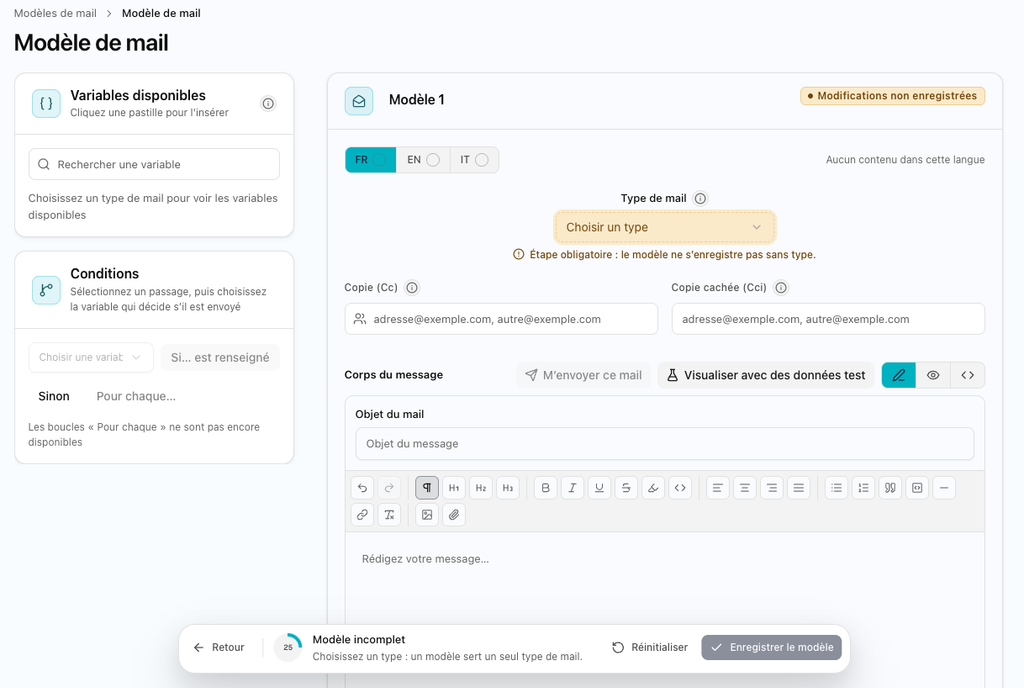
Email templates can now be created and edited directly within the new Mobilehub interface. The editor offers three modes: rich text editing, code mode and a true-to-life preview of the email as it will be received.
To customise the content, a range of variables, filtered by template type, can be inserted directly into the text. The ‘sample data’ option displays the output with realistic values, and a test email can be sent before the email is sent out. Recipients in the ‘CC’ and ‘BCC’ fields are retained.
As for ticketing, the settings now allow you to choose a template for each event × recipient combination. If no template is selected, the default template is applied. Each recipient thus receives a message tailored to their situation, the appearance of which you have checked before sending.
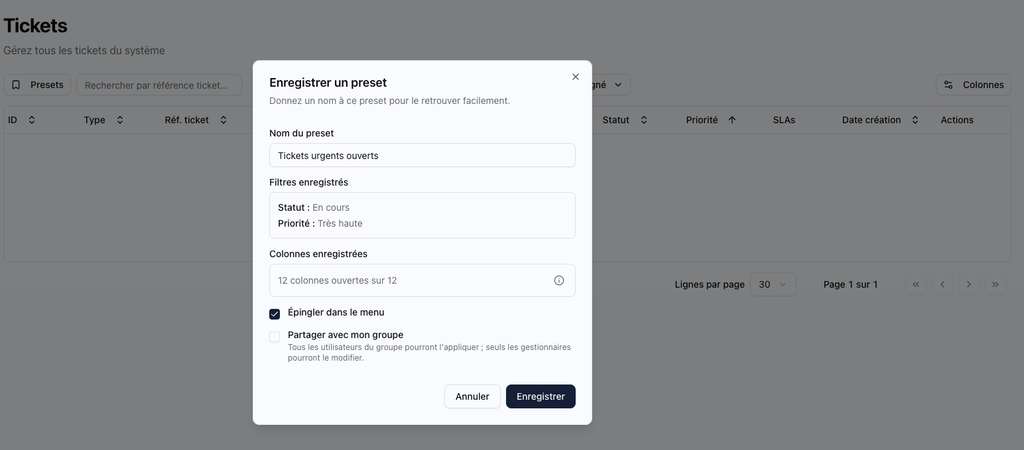
Until now, filters on a ticket list had to be reapplied every time the list was opened. Pinned views remove this step: your favourite views appear directly in the menu, and the list opens with the filters already applied.
Each user can pin their own views, such as the view for completed tickets. A manager can also share a view with their team, so that the whole team works from the same list. Pinned views are available for tickets, requests and approvals.
This means everyone can access their usual work list with a single click.
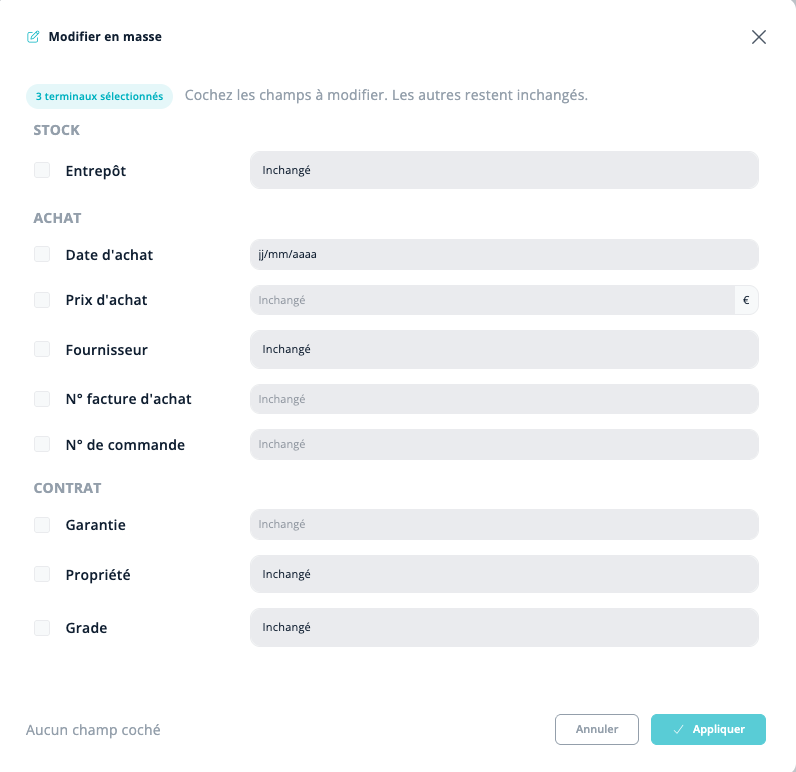
Until now, updating the supplier or warranty details for all devices in a single order required editing them one by one. Two new tools now allow you to process an entire batch.
The first is the bulk edit function, accessible via the Actions menu in the equipment table. It applies a change to all ticked devices, limited to the selected fields: stock, purchase date and price, supplier, invoice and order numbers, warranty, ownership or grade. A summary then shows the number of devices modified and details each rejection along with the reason.
The second is the multiple search function. Simply paste an Excel column into the dedicated window to retrieve all devices matching at least one value, with no duplicates or empty rows. The search field also accepts “&” to combine multiple terms (iPhone&Paris), as well as “|” to search for one or the other. These operators work on equipment, lines, movements, expected returns and buy-backs.
A bulk edit can cover up to 500 devices, and a multiple search can cover up to 300 values. This is enough to process a delivery or check a list in a single operation.
Until now, SLA alerts in the ticketing system were the same for everyone: a first alert two hours before the deadline, and a second at the deadline. Each agent can now set their own alerts, depending on their role and organisation.
An alert relates to an SLA rule for a specific ticket type. It is possible to create several alerts for the same rule, and then duplicate them for another rule. The alert is triggered at the deadline or at a selected time before it, calculated in the group’s working hours in 15-minute increments.
Two delivery methods are available: a single alert per ticket, or a summary sent every hour, every 4 hours or daily at the start of the group’s working hours. No summary is sent if the list is empty. The alert is delivered via the app and by email, with the option to include the group’s notification addresses. A ticketing owner can also assign an alert to participants, who remain free to add their own. The settings are also accessible via the v1 API. This ensures that everyone receives the alerts relevant to their role, at a frequency that suits them.
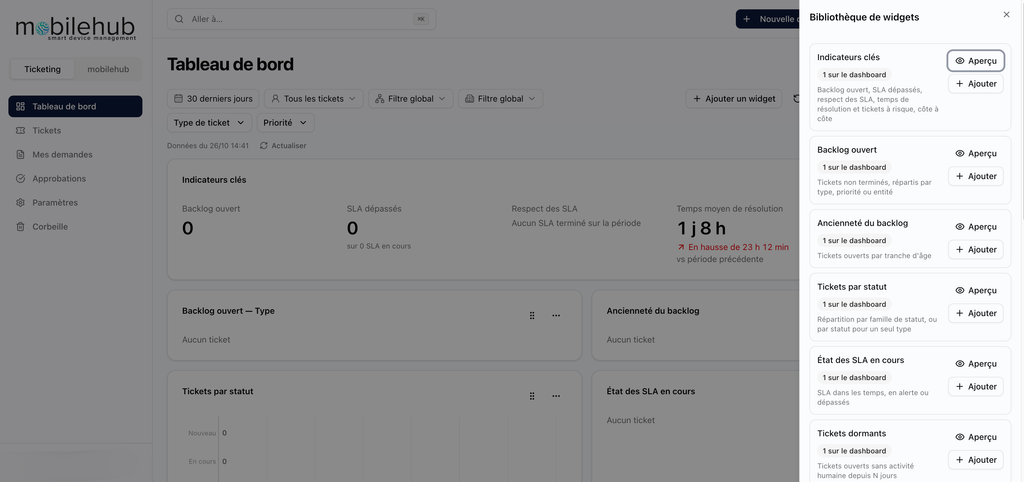
Equipment, lines, tickets: until now, each metric had to be viewed from its own list. To get an overview, you had to switch between screens. Mobilehub now brings this data together in a customisable dashboard, which each user can configure to suit their needs.
The dashboard works using widgets. You choose the ones you need, then select the fields each one displays. Each widget has its own settings and filters: this allows you to restrict a metric to a specific scope without affecting the others. Charts complement the display, enabling you to see the fleet data at a glance rather than line by line.
As everyone creates their own dashboard, each role can find the information relevant to them. A fleet manager might prioritise equipment and routes, whilst a support manager will focus on tickets. Useful metrics are brought together in one place, visible at a glance.
Before, the link in an email notifying a change in priority would open the list of tickets, rather than the relevant ticket itself. From now on, every ticketing notification email contains a link to the request or ticket, selected according to the recipient’s role:
→ Beneficiary, submitter and manager: My requests, with the open request;
→ Approver: Requests to approve, with the open request;
→ Assigned agent and contact address: the ticket, or the request if no ticket has yet been created.
The link is included for requests that have been registered, approved or rejected. It is displayed in the recipient’s language, and the notification within the application contains the same link. Only the default email sent to contact addresses does not include a link. A single click is therefore all it takes to access the item to be processed.
If you’re already using Mobilehub, all it takes is a few simple settings to make the most of these new features:
→ Set up your SLA alerts. This is a priority, as automatic alerts have been removed.
→ Choose your email templates for the most common ticketing events, then send a test email.
→ Carry out an initial physical inventory at the location where the most devices are in use.
→ Customise your dashboard with the metrics you check most often.
Each update is detailed in the release notes, which can be accessed via the platform.
Each of these developments addresses a specific need. Together, they make day-to-day life easier for teams managing a fleet: fewer repetitive data entries, more reliable data, and alerts sent to the right person at the right time. They build on the guiding principle behind Mobilehub: bringing together in a single tool what was previously scattered, so that fleet management takes less time.
💡 Haven’t heard of Mobilehub yet? Give it a go or find out more with our teams.
→ 1 month’s free trial: https://app.mobilehub.co/registration
→ Free demo to try it out before you get started: https://www.mobilehub.co/inscription-mobilehub-demo
